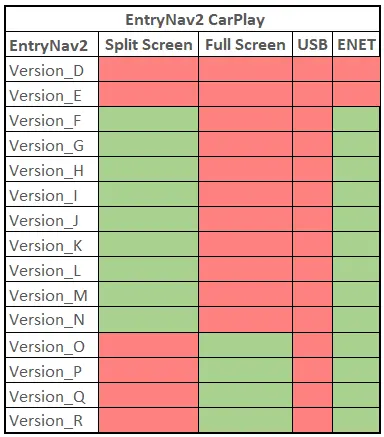
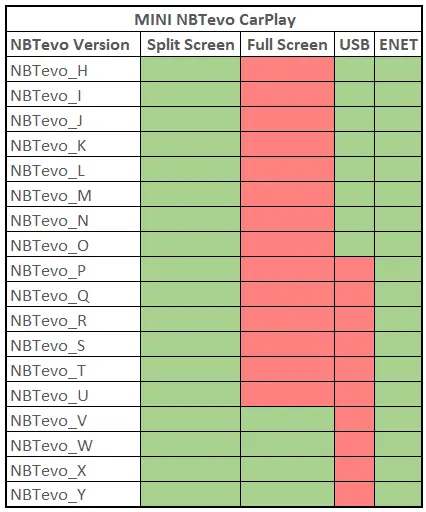
1. Via USB Stick : After you purchase this we will send you the activation files and procedure through email.
You need to use a FAT32 formatted USB. Then you plug it in to the USB port located in the arm rest. That’s it!
You can do it yourself by downloading the procedure:
CarPlay USB Procedure
2. Remote Activation via ENET Cable : We will connect to your laptop and activate Apple CarPlay for you.
Easy and really simple to do, no technical knowledge required at all.
For remote coding, you require ENET cable and Windows laptop (Check requirements below).
You can do it yourself by downloading the procedure:
CarPlay ENET Procedure
100% Positive Feedback
Check your unit
Check your current Map and iDrive version: Go to Navigation -> Scroll down to Settings -> Select Position & Version -> Select Version Information
Check your current Software version:
Select My Vehicle -> iDrive settings -> Software update -> Show current version
Road Map “Region” EVO = NBTevo unit
Road Map “Region” WAY= EntryNav2 unit
Buy Now!
BMW NBTevo Units
BMW EnavEvo (EntryNav2) Units
MINI NBTevo Units
MINI EntryEvo (EntryNav2) Units
Select the fields to be shown. Others will be hidden. Drag and drop to rearrange the order.
Image
SKU
Rating
Price
Stock
Availability
Add to cart
Description
Content
Weight
Dimensions
Additional information
Sold
Shipping
Click outside to hide the comparison bar
Compare
We use cookies to ensure that we give you the best experience on our website. If you continue to use this site we will assume that you are happy with it.